
Web funnel vs direct store link
Upside: Test offers without app releases; measure drop-off per step
Downside: Extra click before install; requires maintained web flow
TL;DR
Alex Morgan
Head of Mobile Growth
Updated 2026-06-13
A web-to-app funnel is a guided web journey that sits between your ad click and the mobile app. Instead of sending cold traffic straight to the App Store, you qualify visitors on the web, present your subscription offer, optionally collect payment, and only then hand off to install or account restore.
The model exploded after iOS privacy changes made in-app attribution harder and store fees harder to ignore. Teams running Meta, TikTok, or Google UAC campaigns use web layers to test pricing copy weekly, measure drop-off per screen, and keep more margin on web checkout where policy allows.
web2app.tools is built for this job: a no-code canvas with landing, quiz, calculating, email capture, score result, paywall, checkout, and success steps — plus custom domains, workspace-scoped Stripe/Paddle, and app integration docs for post-purchase access.
Use a web funnel when paid traffic is expensive enough that you need to diagnose drop-off before the store, when you want to test annual vs monthly pricing without an app release, or when your offer requires education (quiz + proof) before price.
Skip it when your app is almost entirely ASO-driven with tiny paid budgets, when your category forbids web checkout for your SKU, or when your team cannot maintain a second surface (web + app) with aligned copy.
Teams that match most of these signals usually see the fastest ROI from web2app flows:
A direct store link or single landing page may be enough when:
Treat the funnel as a pipeline with measurable conversion between nodes. Directional ranges below come from anonymized early web2app cohorts and public industry write-ups — use them for internal targets, not guarantees.
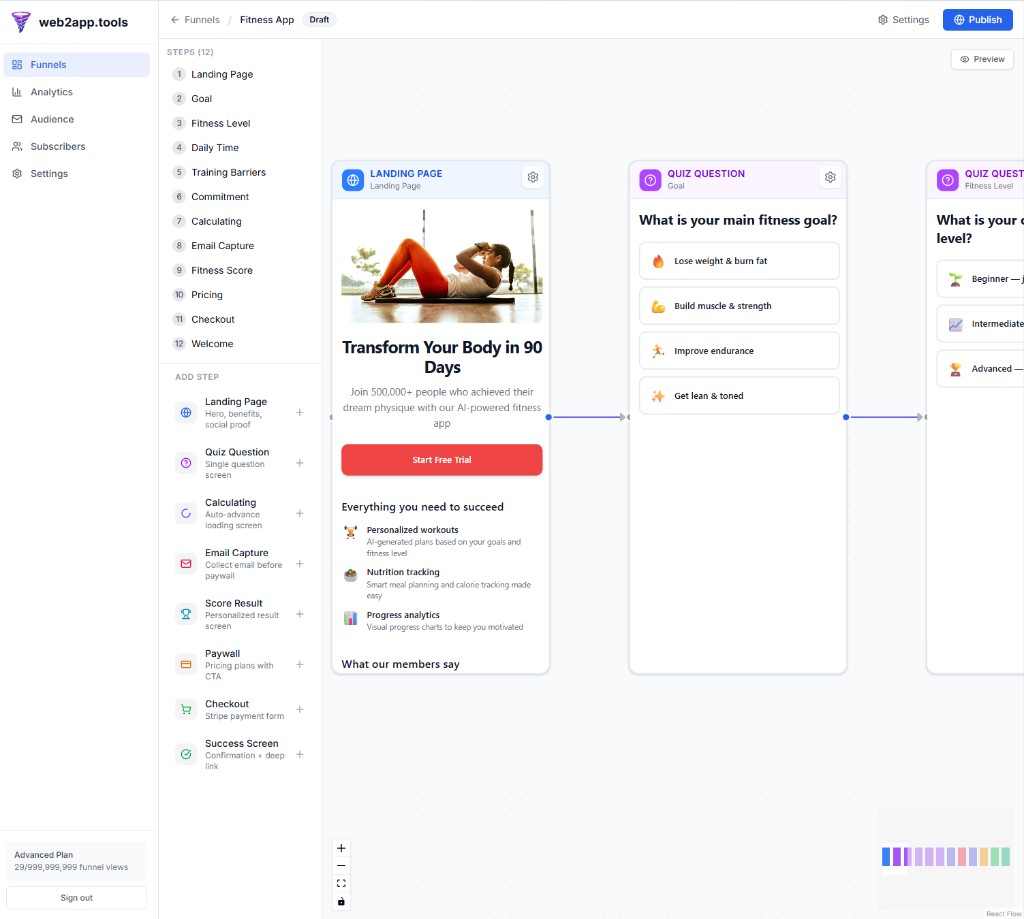
The landing step must repeat the ad promise in the first screen without navigation leaks. One hero headline, one audience, one primary CTA. Social proof belongs above the fold on paid traffic — not in a footer.
Performance basics: target LCP under 2.5s on 4G, avoid heavy carousels, and keep the first tap obvious (contrasting CTA, thumb-zone placement). Custom domains help trust: `start.yourbrand.com` converts better than a generic builder hostname for many subscription categories.
Quiz steps work because they combine commitment consistency with personalization: visitors who answer three questions feel invested before they see price. The sweet spot on paid social is often 4–7 questions; longer assessments belong in organic or email traffic.
Branch answers to different paywall variants (annual emphasis vs trial emphasis) instead of one generic offer. In web2app, connect quiz answers to transitions on the canvas and optionally feed score result steps for summarized outcomes.
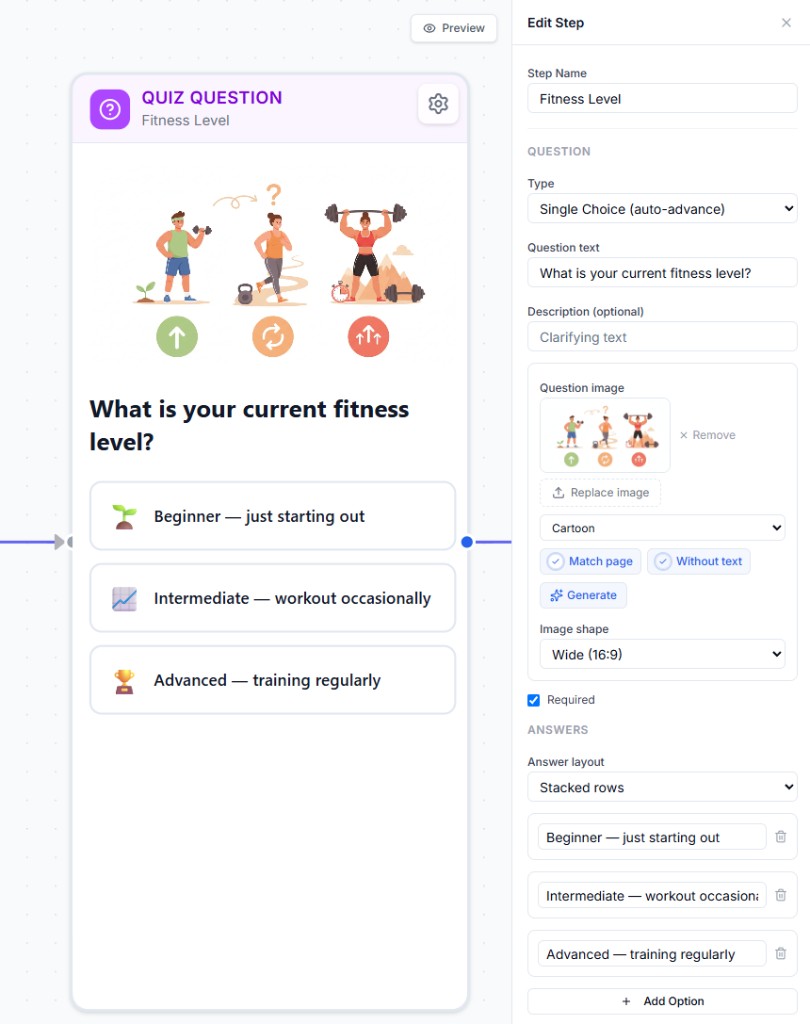
A 15-question survey on cold Meta traffic often collapses completion rates. If you need that much data, split: short qualifier on the web, deeper profile in-app after install.
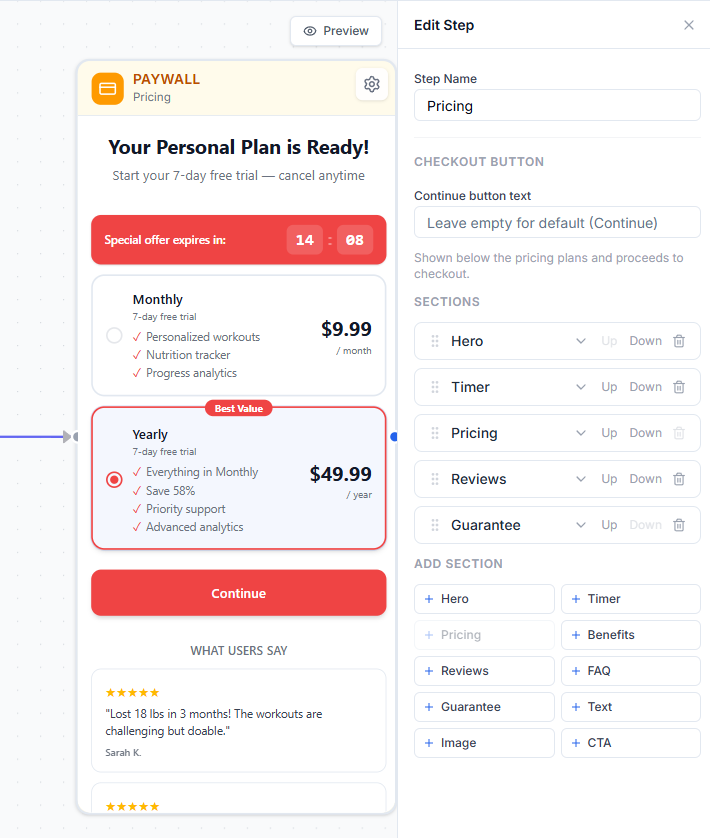
Your web paywall should sell transformation, not feature lists. Lead with the outcome, show one recommended plan, and make annual savings explicit (percent and dollar). Trials must state renewal terms and cancellation path clearly — this supports both compliance and chargeback defense.
web2app paywalls are section-based: hero, benefits, pricing display, reviews, FAQ, images, and CTA blocks you can reorder without code. Duplicate the funnel to test one section change per week so analytics stay interpretable.
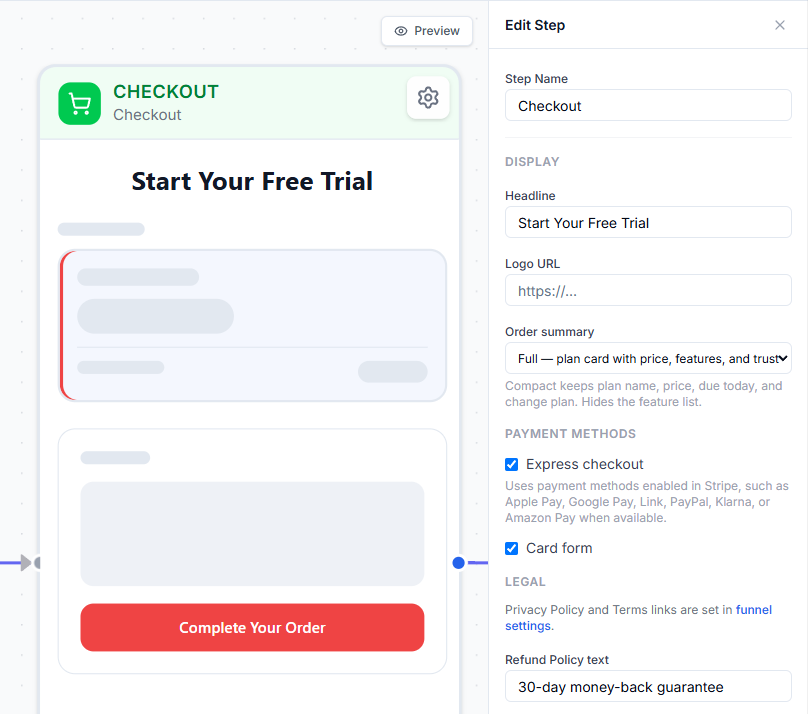
Stripe and Paddle are the two common paths in web2app workspaces. Stripe gives you full control and pairs with Stripe Tax if you configure it; Paddle acts as merchant of record on supported geographies, which simplifies VAT/sales tax for some teams.
Enable express checkout (Apple Pay / Google Pay) where available — wallet flows often lift checkout completion on mobile. For EU buyers, plan for SCA/3DS2 challenge rates in your forecasts.
Neither is universally better — the choice is tax/compliance burden vs control.
Payment on the web is only half the job. The success step must answer: how does this person open the app with the right entitlement? Patterns include store badges with campaign parameters, QR codes for desktop-to-mobile handoff, email with access codes, and deep links documented in app integration guides.
The critical UX rule: a user who already paid should never pay again at the native paywall. Your app must recognize web purchase via webhook, access code, or subscription sync — document the path your engineers will implement.
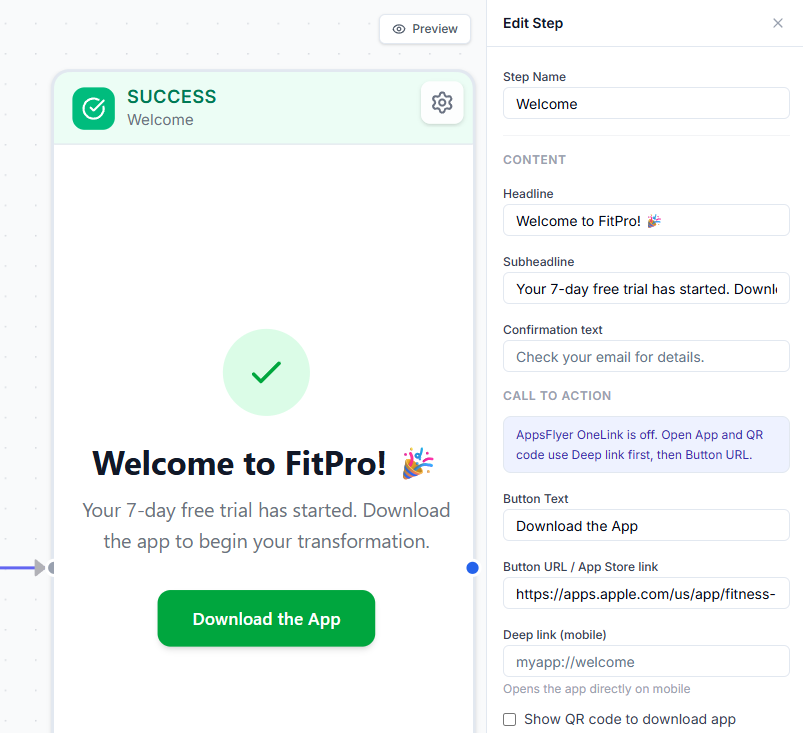
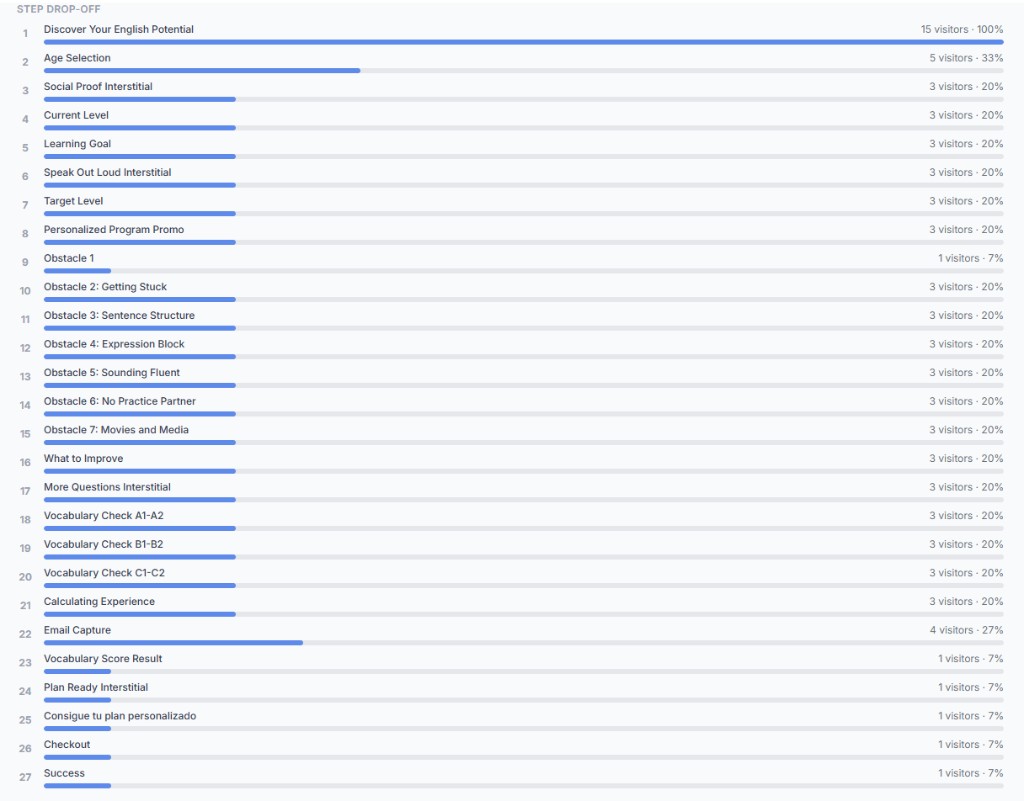
Measure every step inside web2app analytics before you trust platform ROAS alone. Built-in A/B testing lets you run funnel variants — different paywall copy, quiz length, or annual default — and compare per-step conversion side by side.
Split traffic between variants at the campaign level, watch which version wins on checkout or paywall views, then scale the winner. Pair step metrics with your MMP (AppsFlyer, Adjust, Branch) and ad pixels configured in funnel settings.
Point ads to a branded hostname with SSL — not a raw store URL. web2app handles per-funnel slugs and custom domain attachment at the workspace level; follow DNS instructions in funnel settings before going live.
You do not need to wire every step manually on day one. Describe your product or paste an App Store link — AI drafts landing, quiz, paywall, checkout, and success steps on the canvas with copy in your chosen locale. Refine branching, pricing sections, and images in the visual editor, then publish on a custom domain.
The goal is minutes-to-live, not weeks of back-and-forth. Connect Stripe or Paddle keys in workspace settings, run one test purchase, and point ads at your branded URL. Competitive self-serve pricing means you start without a sales demo or revenue-share negotiation.
FunnelFox and Web2Wave are specialized web2app competitors. FunnelFox goes deepest on multi-PSP billing orchestration and enterprise CRM. Web2Wave goes deepest on mobile SDK entitlement sync and integration catalog breadth.
web2app.tools competes where most growth teams start: competitive self-serve pricing, AI funnel generation, built-in A/B tests, easy workspace setup, and fast launch on custom domains with Stripe/Paddle. We are lighter on unified multi-PSP billing routers and native mobile SDK sync — see comparison pages for detail.
The most common failures we see are process failures, not missing features: launching to paid traffic before a test purchase works, hiding cancellation terms, or sending users to the store before they understand the subscription.
Use this list before sending paid traffic to a new funnel. Check items off in your workspace as you ship.
Typical web-to-app funnel flow for paid acquisition
Landing
Match ad promise with a focused headline, proof, and one primary CTA. Avoid navigation that leaks traffic.
Quiz
Ask 3–6 intent questions. Branch to a plan, intensity level, or use case before showing price.
Paywall
Present plans with transformation copy, FAQ, and reviews. Keep one clear recommended plan.
Checkout
Use Stripe or Paddle on the web. Collect payment before or alongside trial start.
App handoff
Success screen with store badges, deep link, or access code. Pass campaign params for attribution.
Upside: Test offers without app releases; measure drop-off per step
Downside: Extra click before install; requires maintained web flow
Upside: Higher relevance and better trial quality
Downside: Adds friction for users who already know the product
Upside: Faster pricing experiments; potentially better margin where allowed
Downside: Two billing surfaces to keep aligned; policy constraints per category
Yes. web2app supports custom domains with SSL so paid traffic can land on a branded web-to-app funnel instead of a generic hostname or bare store link.
Yes. Use Stripe or Paddle checkout steps, success screens, webhooks, and the app integration docs to route buyers into the mobile app with the right entitlement.
Most teams start with 4–7 intent questions on Meta or TikTok traffic. Longer assessments work better for warm audiences or email, not cold clicks.
Stripe fits teams already on Stripe billing who handle tax reporting. Paddle can simplify merchant-of-record tax in supported markets. Both work as workspace-scoped checkout steps in web2app.
Web subscriptions with clear terms and accessible cancellation are widely used, but your SKU and category matter. Review Apple and Google policies for your content type and keep pricing transparent on the web.
Document a restore path: webhook, access code, or email magic link so paid web users skip the native paywall. Test with a real purchase before scaling ads.
Ranges vary by category and traffic temperature. Use step analytics to find your weakest adjacent step first — absolute drop matters more than industry averages.
Yes. web2app includes built-in funnel A/B testing: create variants, split traffic, and compare per-step conversion on landing, quiz, and paywall screens. Change one variable per test for clear results.
Describe your product or provide an App Store link. AI drafts landing, quiz, paywall, checkout, and success steps on the canvas with localized copy. You refine branching, pricing, and images before publishing.
Pass campaign parameters through landing URLs and success handoff links. Pair built-in step metrics with your MMP and ad pixels configured in funnel settings.
Consider FunnelFox if unified multi-PSP billing CRM is mandatory. Consider Web2Wave if native SDK entitlement sync is required. web2app.tools fits teams that want competitive pricing, AI funnel creation, built-in A/B tests, and the fastest self-serve launch.